

Bring the moody magic of a misty autumn walk to your photos. The Falling Leaves preset takes pale, flat forest shots and turns them into rich, atmospheric scenes with glowing teal fog, vivid autumn oranges, and deep, lush shadows.

Before After Imagery:
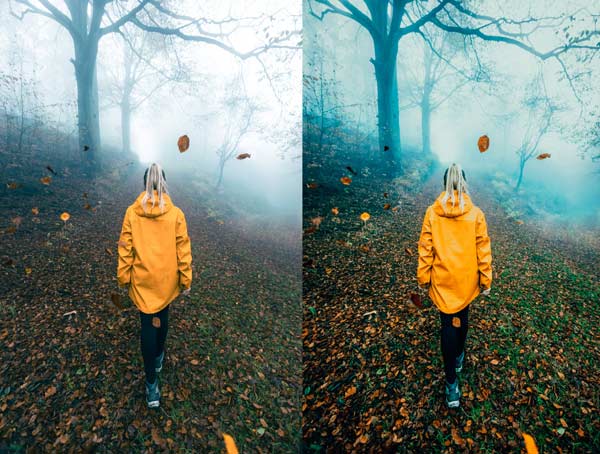
Free Falling Leaves Lightroom Preset:
Best for:
- Autumn, forest, and woodland photography
- Foggy, misty, and overcast outdoor scenes
- Adventure, travel, and moody lifestyle portraits
- Photographers who want a bold, atmospheric, cinematic feed
What it does:
- Turns fog and haze into rich, glowing teal and cyan tones
- Boosts yellows and oranges in jackets, leaves, and autumn details
- Deepens shadows and adds contrast for a moody, dramatic base
- Enriches greens and earthy browns on the forest floor
- Adds clarity and depth so subjects stand out against the mist
Tip: Works best on foggy or overcast forest scenes with a colorful subject or autumn leaves. If the teal looks too strong, lower the aqua or blue saturation slightly. If the shadows feel too dark, lift the shadows or raise the exposure a touch.
Compatibility & Features
Our presets are compatible with Lightroom Desktop & Mobile Versions
The presets comes with DNG, XMP, and LRTEMPLATE Format
Presets are compatible with Adobe Photoshop, Camera Raw and Premier Pro
Works with all image and photo formats (.jpg, .png, .raw, .tiff…).
Compatible with Lightroom Mac & Windows
Compatible with all Adobe Photoshop Lightroom® versions: Lightroom 4 or later, Adobe Lightroom CC Desktop 1.4 or later, Lightroom Classic & Lightroom Mobile app ( iOS & Android).
Instant Download Link & Installation Instructions!
Leave a Reply