
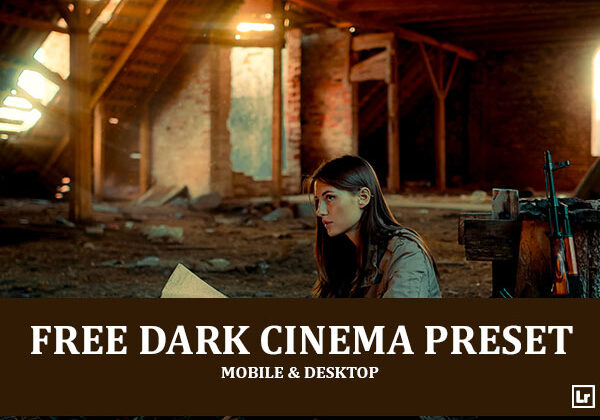
Give your dark, moody scenes a dramatic, cinematic movie-style finish. The Dark Cinema preset takes underexposed, flat low-light shots and turns them into rich, atmospheric images with glowing warm highlights, deep teal-green shadows, lifted detail in the dark areas, and a gritty, film-inspired mood.
Before After Imagery:
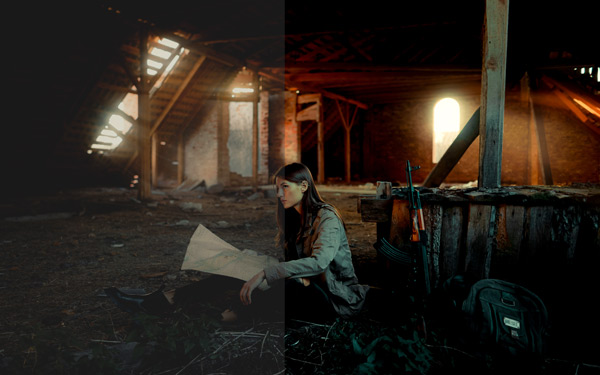
Free Dark Cinema Lightroom Preset:
Best for:
- Cinematic, conceptual, and storytelling portraits
- Low-light, indoor, and abandoned location photography
- Urban exploration, editorial, and moody fashion shoots
- Photographers who want a dark, cinematic, movie-still look across a gallery
What it does:
- Brightens and reveals detail in very dark, underexposed areas
- Adds warm orange and amber glow to light sources and highlights
- Gives shadows a deep teal-green tint for a classic cinematic palette
- Keeps skin tones natural against the moody background
- Adds contrast, depth, and texture for a gritty, atmospheric feel
Tip: Works best on low-light photos with a clear light source, such as windows, lamps, or sunbeams. If the image looks too dark, raise the exposure or lift the shadows. If the teal tones feel too strong, lower the green and blue saturation slightly.
Compatibility & Features
Our presets are compatible with Lightroom Desktop & Mobile Versions
The presets comes with DNG, XMP, and LRTEMPLATE Format
Presets are compatible with Adobe Photoshop, Camera Raw and Premier Pro
Works with all image and photo formats (.jpg, .png, .raw, .tiff…).
Compatible with Lightroom Mac & Windows
Compatible with all Adobe Photoshop Lightroom® versions: Lightroom 4 or later, Adobe Lightroom CC Desktop 1.4 or later, Lightroom Classic & Lightroom Mobile app ( iOS & Android).
Instant Download Link & Installation Instructions!
Leave a Reply